SQL JOIN Commands
Perform JOIN operations with SQL
Introduction
Section titled “Introduction”SQL (Structured Query Language) is a domain-specific language used to manage data, especially in a relational database management system (RDBMS)
JOIN clause combines rows from two or more tables, based on a related column between them.
Here are the different types of JOINs in SQL:
INNER JOIN: returns only rows that have matching values in both tablesLEFT (OUTER) JOIN: returns all rows from the left table, and only the matched rows from the right tableRIGHT (OUTER) JOIN: returns all rows from the right table, and only the matched rows from the left tableFULL (OUTER) JOIN: returns all rows when there is a match in either the left or right table
Let’s take a couple of tables named sensors and rooms.
Most of the code blocks below must run within MySQL command line interface.
It usually has mysql> string beforehand each command.
First of all, you must create the database.
CREATE DATABASE test;
USE test; # tells to use the newly created test DB
Then, create the tables you’ll work on.
CREATE TABLE command is used to create a new table.
You must provide data type definition foreach column of the table.
CREATE TABLE IF NOT EXISTS sensors (  id INT PRIMARY KEY AUTO_INCREMENT,  temperature FLOAT NOT NULL COMMENT 'Temperature in Celsius degree measured by the sensor',  time TIME NOT NULL COMMENT 'Time in hh:mm:ss format of the moment in which the data was captured',  room_id INT NOT NULL COMMENT 'Identifier of the room where the sensor is located');
CREATE TABLE IF NOT EXISTS rooms (  room_id INT PRIMARY KEY AUTO_INCREMENT,  name VARCHAR(10) NOT NULL COMMENT 'Room name',  square_meters INT NOT NULL COMMENT 'Dimension of the room in square meters');
You can then take a look at the structure of the table with:
DESCRIBE sensors;
DESCRIBE rooms;
It will output this:
+-------------+-------+------+-----+---------+----------------+| Field       | Type  | Null | Key | Default | Extra          |+-------------+-------+------+-----+---------+----------------+| id          | int   | NO   | PRI | NULL    | auto_increment || temperature | float | NO   |     | NULL    |                || time        | time  | NO   |     | NULL    |                || room_id     | int   | NO   |     | NULL    |                |+-------------+-------+------+-----+---------+----------------+
+---------------+-------------+------+-----+---------+----------------+| Field         | Type        | Null | Key | Default | Extra          |+---------------+-------------+------+-----+---------+----------------+| room_id       | int         | NO   | PRI | NULL    | auto_increment || name          | varchar(10) | NO   |     | NULL    |                || square_meters | int         | NO   |     | NULL    |                |+---------------+-------------+------+-----+---------+----------------+
Then insert some data in order to test different joins:
-- insert sensorsINSERT INTO sensors (temperature, time, room_id) VALUES(21.5, '08:00:00', 1),(22.0, '12:00:00', 1),(19.8, '08:00:00', 2),(20.1, '18:00:00', 2),(23.4, '09:30:00', 3),(30.0, '10:00:00', 99);  -- orphan sensor: room_id 99 doesn't exist in rooms
-- insert roomsINSERT INTO rooms (room_id, name, square_meters) VALUES(1, 'Kitchen', 15),(2, 'Bedroom', 20),(3, 'Office', 12),(4, 'Bathroom', 6),   -- no sensors will reference this room(5, 'Attic', 25);     -- no sensors will reference this room either
INNER JOIN
Section titled “INNER JOIN”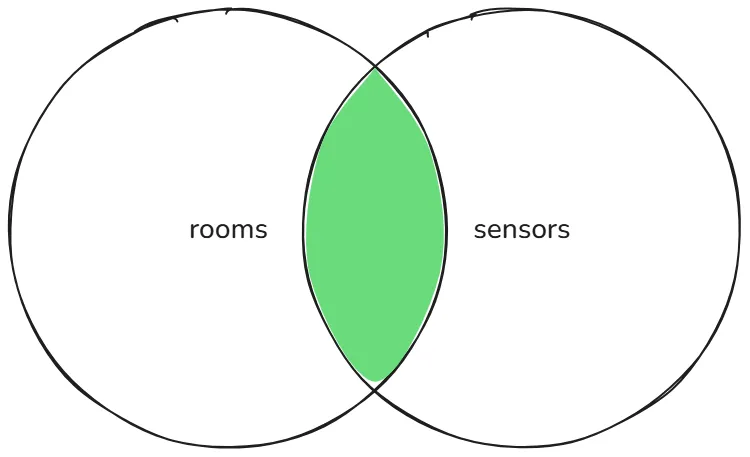
SELECT rooms.name, sensors.temperature, sensors.timeFROM roomsINNER JOIN sensors ON rooms.room_id = sensors.room_id;The above query can be simplified into this query:
SELECT r.name, s.temperature, s.timeFROM rooms rINNER JOIN sensors s ON r.room_id = s.room_id;The result of this INNER JOIN query is:
+---------+-------------+----------+| name | temperature | time |+---------+-------------+----------+| Kitchen | 21.5 | 08:00:00 || Kitchen | 22 | 12:00:00 || Bedroom | 19.8 | 08:00:00 || Bedroom | 20.1 | 18:00:00 || Office | 23.4 | 09:30:00 |+---------+-------------+----------+It is returning only rows that have matching values in both tables.
LEFT JOIN
Section titled “LEFT JOIN”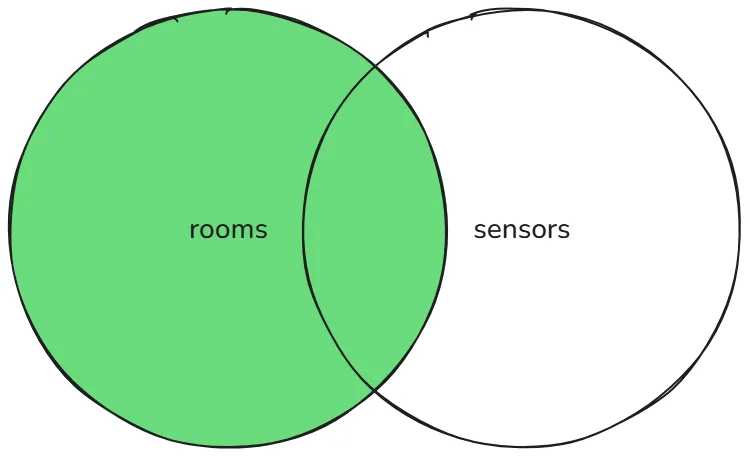
Left table is rooms while right table is sensors.
SELECT r.name, s.temperature, s.timeFROM rooms rLEFT JOIN sensors s ON r.room_id = s.room_id;The result of this LEFT JOIN query is:
+----------+-------------+----------+| name | temperature | time |+----------+-------------+----------+| Kitchen | 22 | 12:00:00 || Kitchen | 21.5 | 08:00:00 || Bedroom | 20.1 | 18:00:00 || Bedroom | 19.8 | 08:00:00 || Office | 23.4 | 09:30:00 || Bathroom | NULL | NULL || Attic | NULL | NULL |+----------+-------------+----------+Returns all rooms, even without sensors.
RIGHT JOIN
Section titled “RIGHT JOIN”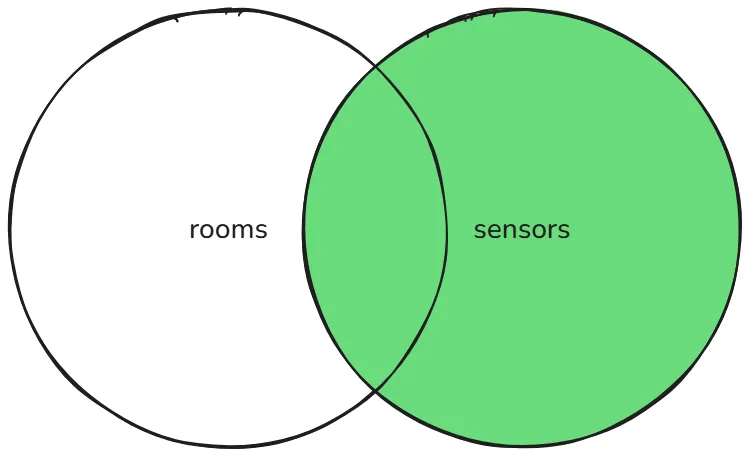
Left table is rooms while right table is sensors.
SELECT r.name, s.temperature, s.timeFROM rooms rRIGHT JOIN sensors s ON r.room_id = s.room_id;The result of this RIGHT JOIN query is:
+---------+-------------+----------+| name | temperature | time |+---------+-------------+----------+| Kitchen | 21.5 | 08:00:00 || Kitchen | 22 | 12:00:00 || Bedroom | 19.8 | 08:00:00 || Bedroom | 20.1 | 18:00:00 || Office | 23.4 | 09:30:00 || NULL | 30 | 10:00:00 |+---------+-------------+----------+Returns all sensors, even the one that are not assigned to any rooms.
FULL JOIN
Section titled “FULL JOIN”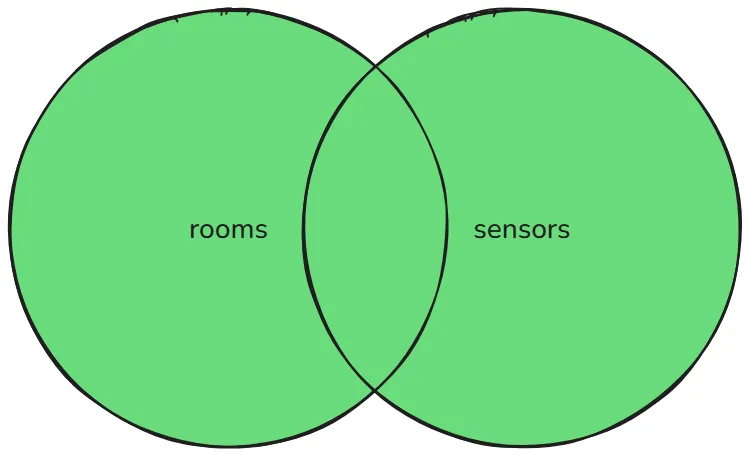
Since MySQL cannot use FULL JOIN clause, you’ll need to emulate it:
SELECT r.name, s.temperature, s.timeFROM rooms rLEFT JOIN sensors s ON r.room_id = s.room_idUNIONSELECT r.name, s.temperature, s.timeFROM rooms rRIGHT JOIN sensors s ON r.room_id = s.room_id;The result of this query is:
+----------+-------------+----------+| name | temperature | time |+----------+-------------+----------+| Kitchen | 22 | 12:00:00 || Kitchen | 21.5 | 08:00:00 || Bedroom | 20.1 | 18:00:00 || Bedroom | 19.8 | 08:00:00 || Office | 23.4 | 09:30:00 || Bathroom | NULL | NULL || Attic | NULL | NULL || NULL | 30 | 10:00:00 |+----------+-------------+----------+