Arduino MIDI Device
Arduino meets music

Introduction
Section titled “Introduction”Arduino boards uses MIDIUSB library to interact as MIDI devices. Arduino board will use the code placed within Arduino Projects GitLab repository. Python control scripts use mido library, let’s open a terminal and install the required libraries:
pip install midopip3 install python-rtmidiMIDI Notes Number
Section titled “MIDI Notes Number”Notes number ranges from 0 to 127 (which is the range of seven bit data). These numbers relate directly to the note to be generated. The octave is indicated after the letter note name but to confuse things a bit, middle C on a piano (which is indicated by the MIDI note number 60) is sometimes designated as as C3 and sometimes as C4, depending on the manufacturer.
The frequency is evaluated assuming equal tuning based on A4 equal 440 Hz:
f = 440 \cdot 2^{(n-69)/12}The full table is at the bottom of this post to allow a better readability.
| MIDI Note Number | Note Names | Frequency (Hz) |
|---|---|---|
| 0 | C(-1) | 8.18 |
| … | … | … |
| 48 | C3 | 130.81 |
| 49 | C#3/Db3 | 138.59 |
| 50 | D3 | 146.83 |
| 51 | D#3/Eb3 | 155.56 |
| 52 | E3 | 164.81 |
| 53 | F3 | 174.61 |
| 54 | F#3/Gb3 | 185.00 |
| 55 | G3 | 196.00 |
| 56 | G#3/Ab3 | 207.65 |
| 57 | A3 | 220.00 |
| 58 | A#3/Bb3 | 233.08 |
| 59 | B3 | 246.94 |
| 60 | C4 | 261.63 |
| … | … | … |
| top of MIDI tuning range | G#9/Ab9 | 13289.75 |
MIDI Write
Section titled “MIDI Write”The board must communicate both when the pitch (note) starts and when it ends. The channel is set to 0 and the velocity to 64. Let’s take any MIDIUSB library compatible board and upload USBMIDI_write_test.ino sketch.
You can run a program like VMPK or Ardour 8 to see the MIDI notes being played. Remind to select the right MIDI device.
MIDI Read
Section titled “MIDI Read”Upload USBMIDI_read_test.ino sketch on the Arduino board. Open a terminal window and run the following python script:
#!/usr/bin/env python3
# ~~~ write-to-device.py ~~~
import mido # pip install midoimport time
if __name__ == "__main__":    # get the list of all the MIDI devices conneted    input_names = mido.get_input_names()
    # choose the name of the USB MIDI device    # you want to send messages to    usb_midi_device_name = input_names[1]
    try:        # open the selected MIDI output port        with mido.open_output(usb_midi_device_name) as port:            print(f"Sending MIDI messages to {usb_midi_device_name}")
            # send Note On message            note_on = mido.Message('note_on', note=60, velocity=64, channel=0)            port.send(note_on)            print(f"Note On sent: {note_on}")
            # wait for a short duration            time.sleep(1)
            # send Note Off message            note_off = mido.Message('note_off', note=60, velocity=64, channel=0)            port.send(note_off)            print(f"Note Off sent: {note_off}")
    except KeyboardInterrupt:        print("Exiting...")
If you open the board’s Serial Monitor, you should see the note n° 60 being turned on and off.
Project Idea: you could build a matrix led that changes according to the given input MIDI signals.
MIDI Loop
Section titled “MIDI Loop”Upload USBMIDI_loop_test.ino sketch on the Arduino board.
Open the first terminal window and run the following script to read the incoming MIDI messages:
#!/usr/bin/env python3
# ~~~ read-MIDI-device.py ~~~
import mido
if __name__ == "__main__":    # list available MIDI ports    input_names = mido.get_input_names()    print(">>> available MIDI ports:")    print(input_names)
    # select desired port    # i.e. "Arduino MKR WiFi 1010:Arduino MKR WiFi 1010 MIDI 1 20:0"    input_port_name = input_names[1]    inport = mido.open_input(input_port_name)
    # loop to receive messages    while True:        for message in inport.iter_pending():            print(message)
Then, open another terminal window and run the previously defined write-to-device.py Python script. You should now see the note n° 60 being turned on and off both on Arduino’s Serial Monitor and on the first terminal window.
Please Note: You can also run read-MIDI-device.py script to test MIDI Write section’s sketch.
Arduino MIDI Piano Project
Section titled “Arduino MIDI Piano Project”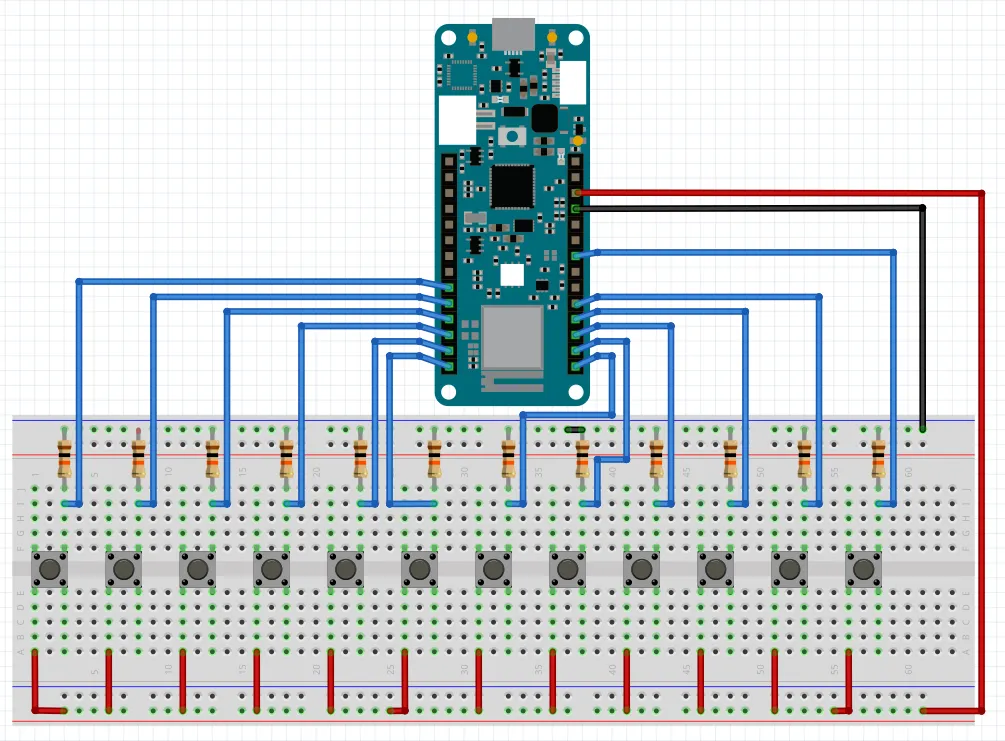
The most easy usage of this schematic is sending a single note (starting from C3) for each switch button attached to the board. The following allows you to play one or more note until you press the corresponding buttons: USBMIDI_switch_btn_write.ino.
Let’s talk about the possibility of both sending singles notes, like it does, or whole chords with a single button. It’s amazing! You could use a couple of buttons to switch the main note (C, C#, …) and the remaining buttons to choose between a variety of chord types like major, minor, 7th, aug, dim, maj7, 5th (very punk) and many more.
Conclusion
Section titled “Conclusion”MIDI Events
Section titled “MIDI Events”MIDI events are specified by status bytes, where the most significant 4 bits indicate the event type, and the least significant 4 bits specify the MIDI channel (if applicable). Here are the most common MIDI events along with their corresponding status bytes:
Note Off: stops the sounding of a note. Status byte range: 0x80 - 0x8F. Note Off on channel 1 is 0x80, channel 2 is 0x81, and so on.
Note On: starts the sounding of a note. Status byte range: 0x90 - 0x9F. Note On on channel 1 is 0x90, channel 2 is 0x91, and so on.
Aftertouch (Polyphonic Key Pressure): sends the pressure level of a single note. Status byte range: 0xA0 - 0xAF.
Control Change: changes the value of a control (e.g., modulation wheel, sustain pedal). Status byte range: 0xB0 - 0xBF.
Program Change: Selects a specific program (instrument) on a channel. Status byte range: 0xC0 - 0xCF.
Aftertouch (Channel Pressure): Sends the pressure level for all notes on a channel. Status byte range: 0xD0 - 0xDF.
Pitch Bend Change: Changes the pitch of all notes on a channel. Status byte range: 0xE0 - 0xEF.
System Exclusive (SysEx): used for manufacturer-specific messages. Status byte: 0xF0 (start) or 0xF7 (continued).
Timing Clock: used for synchronizing MIDI devices. Status byte: 0xF8.
Start Sequence: Starts the playback of a sequence. Status byte: 0xFA.
Continue Sequence: Continues the playback of a paused sequence. Status byte: 0xFB.
Stop Sequence: Stops the playback of a sequence. Status byte: 0xFC.
Active Sensing: Indicates that the MIDI device is still functioning. Status byte: 0xFE.
System Reset: Resets all MIDI devices in the system. Status byte: 0xFF.
These are the main MIDI events and their corresponding status bytes. They are used to control MIDI devices and communicate musical information in MIDI files and streams.
Full Table
Section titled “Full Table”| MIDI Note Number | Note Names | Frequency (Hz) |
|---|---|---|
| 0 | C(-1) | 8.18 |
| 1 | C#(-1)/Db(-1) | 8.66 |
| 2 | D(-1) | 9.18 |
| 3 | D#(-1)/Eb(-1) | 9.72 |
| 4 | E(-1) | 10.30 |
| 5 | F(-1) | 10.91 |
| 6 | F#(-1)/Gb(-1) | 11.56 |
| 7 | G(-1) | 12.25 |
| 8 | G#(-1)/Ab(-1) | 12.98 |
| 9 | A(-1) | 13.75 |
| 10 | A#(-1)/Bb(-1) | 14.57 |
| 11 | B(-1) | 15.43 |
| 12 | C0 | 16.35 |
| 13 | C#0/Db0 | 17.32 |
| 14 | D0 | 18.35 |
| 15 | D#0/Eb0 | 19.45 |
| 16 | E0 | 20.60 |
| 17 | F0 | 21.83 |
| 18 | F#0/Gb0 | 23.12 |
| 19 | G0 | 24.50 |
| 20 | G#0/Ab0 | 25.96 |
| 21 | A0 | 27.50 |
| 22 | A#0/Bb0 | 29.14 |
| 23 | B0 | 30.87 |
| 24 | C1 | 32.70 |
| 25 | C#1/Db1 | 34.65 |
| 26 | D1 | 36.71 |
| 27 | D#1/Eb1 | 38.89 |
| 28 | E1 | 41.20 |
| 29 | F1 | 43.65 |
| 30 | F#1/Gb1 | 46.25 |
| 31 | G1 | 49.00 |
| 32 | G#1/Ab1 | 51.91 |
| 33 | A1 | 55.00 |
| 34 | A#1/Bb1 | 58.27 |
| 35 | B1 | 61.74 |
| 36 | C2 | 65.41 |
| 37 | C#2/Db2 | 69.30 |
| 38 | D2 | 73.42 |
| 39 | D#2/Eb2 | 77.78 |
| 40 | E2 | 82.41 |
| 41 | F2 | 87.31 |
| 42 | F#2/Gb2 | 92.50 |
| 43 | G2 | 98.00 |
| 44 | G#2/Ab2 | 103.83 |
| 45 | A2 | 110.00 |
| 46 | A#2/Bb2 | 116.54 |
| 47 | B2 | 123.47 |
| 48 | C3 | 130.81 |
| 49 | C#3/Db3 | 138.59 |
| 50 | D3 | 146.83 |
| 51 | D#3/Eb3 | 155.56 |
| 52 | E3 | 164.81 |
| 53 | F3 | 174.61 |
| 54 | F#3/Gb3 | 185.00 |
| 55 | G3 | 196.00 |
| 56 | G#3/Ab3 | 207.65 |
| 57 | A3 | 220.00 |
| 58 | A#3/Bb3 | 233.08 |
| 59 | B3 | 246.94 |
| 60 | C4 | 261.63 |
| 61 | C#4/Db4 | 277.18 |
| 62 | D4 | 293.66 |
| 63 | D#4/Eb4 | 311.13 |
| 64 | E4 | 329.63 |
| 65 | F4 | 349.23 |
| 66 | F#4/Gb4 | 369.99 |
| 67 | G4 | 392.00 |
| 68 | G#4/Ab4 | 415.30 |
| 69 | A4 | 440.00 |
| 70 | A#4/Bb4 | 466.16 |
| 71 | B4 | 493.88 |
| 72 | C5 | 523.25 |
| 73 | C#5/Db5 | 554.37 |
| 74 | D5 | 587.33 |
| 75 | D#5/Eb5 | 622.25 |
| 76 | E5 | 659.25 |
| 77 | F5 | 698.46 |
| 78 | F#5/Gb5 | 739.99 |
| 79 | G5 | 783.99 |
| 80 | G#5/Ab5 | 830.61 |
| 81 | A5 | 880.00 |
| 82 | A#5/Bb5 | 932.33 |
| 83 | B5 | 987.77 |
| 84 | C6 | 1046.50 |
| 85 | C#6/Db6 | 1108.73 |
| 86 | D6 | 1174.66 |
| 87 | D#6/Eb6 | 1244.51 |
| 88 | E6 | 1318.51 |
| 89 | F6 | 1396.91 |
| 90 | F#6/Gb6 | 1479.98 |
| 91 | G6 | 1567.98 |
| 92 | G#6/Ab6 | 1661.22 |
| 93 | A6 | 1760.00 |
| 94 | A#6/Bb6 | 1864.66 |
| 95 | B6 | 1975.53 |
| 96 | C7 | 2093.00 |
| 97 | C#7/Db7 | 2217.46 |
| 98 | D7 | 2349.32 |
| 99 | D#7/Eb7 | 2489.02 |
| 100 | E7 | 2637.02 |
| 101 | F7 | 2793.83 |
| 102 | F#7/Gb7 | 2959.96 |
| 103 | G7 | 3135.96 |
| 104 | G#7/Ab7 | 3322.44 |
| 105 | A7 | 3520.00 |
| 106 | A#7/Bb7 | 3729.31 |
| 107 | B7 | 3951.07 |
| 108 | C8 | 4186.01 |
| 109 | C#8/Db8 | 4434.92 |
| 110 | D8 | 4698.63 |
| 111 | D#8/Eb8 | 4978.03 |
| 112 | E8 | 5274.04 |
| 113 | F8 | 5587.65 |
| 114 | F#8/Gb8 | 5919.91 |
| 115 | G8 | 6271.93 |
| 116 | G#8/Ab8 | 6644.88 |
| 117 | A8 | 7040.00 |
| 118 | A#8/Bb8 | 7458.62 |
| 119 | B8 | 7902.13 |
| 120 | C9 | 8372.02 |
| 121 | C#9/Db9 | 8869.84 |
| 122 | D9 | 9397.27 |
| 123 | D#9/Eb9 | 9956.06 |
| 124 | E9 | 10548.08 |
| 125 | F9 | 11175.30 |
| 126 | F#9/Gb9 | 11839.82 |
| 127 | G9 | 12543.86 |
| top of MIDI tuning range | G#9/Ab9 | 13289.75 |
- MIDIUSB library
- MKRWiFi1010 board
- MKRWiFi1010 full pinout
- theproaudiofiles.com MIDI Guide
- inspiredacoustics.com MIDI notes
- state change detection with push buttons