Skip to content

MacroPad RP2040 Info

MacroPad info
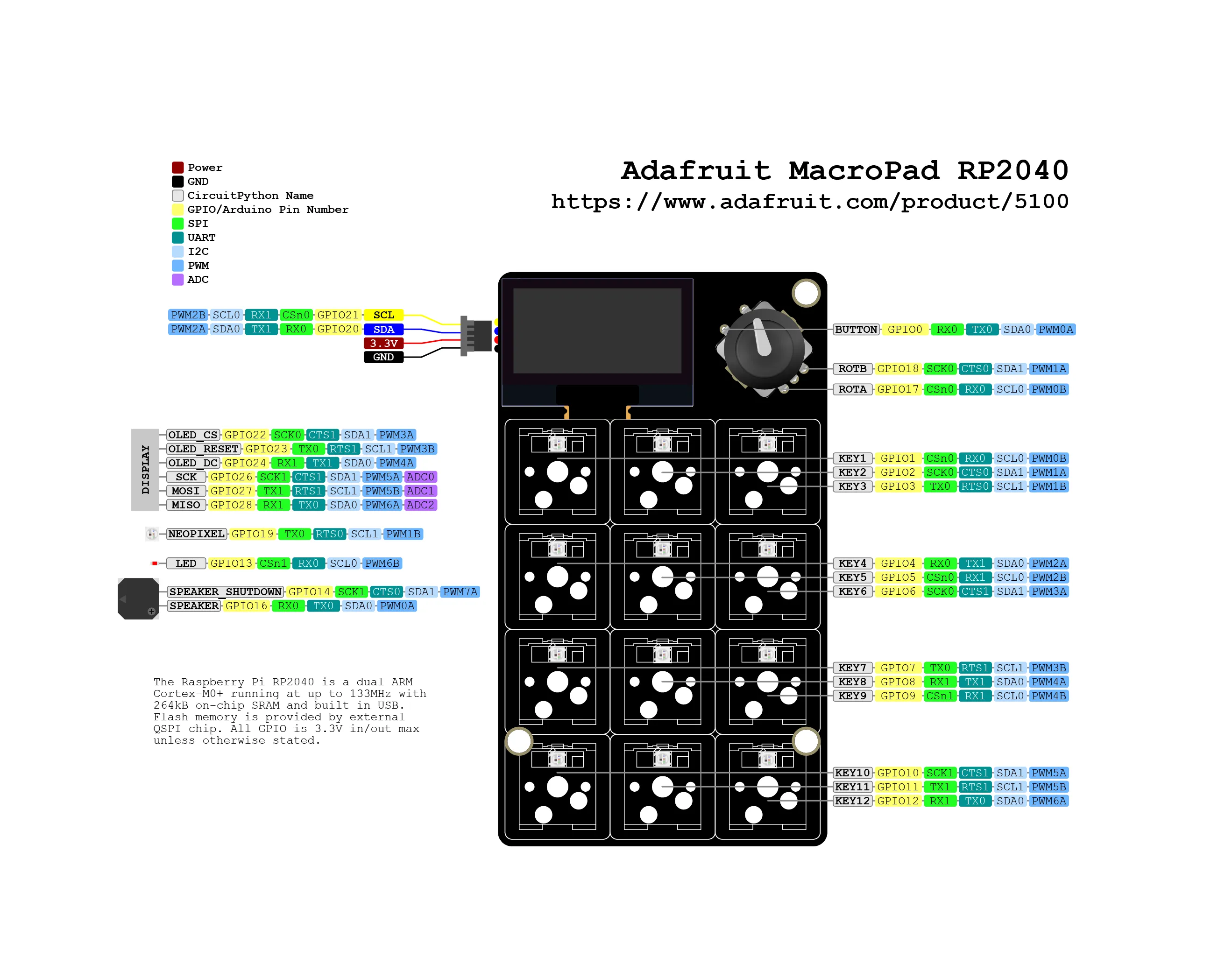
adafruit-macropad-rp2040-pinout

You can buy MacroPad on the official Adafruit store.

This blog post will allow you to print pad information.

code.py
"""
Simpletest demo for MacroPad. Displays the key pressed, the relative position of the rotary
encoder, and the state of the rotary encoder switch to the built-in display. Note that the key
pressed line does not appear until a key is pressed.
https://learn.adafruit.com/adafruit-macropad-rp2040/macropad-display-text
"""
from adafruit_macropad import MacroPad
macropad = MacroPad()
text_lines = macropad.display_text(title="MacroPad Info")
while True:
key_event = macropad.keys.events.get()
if key_event and key_event.pressed:
text_lines[0].text = f"Key {key_event.key_number} pressed!"
text_lines[1].text = f"Rotary encoder {macropad.encoder}"
text_lines[2].text = f"Encoder switch: {macropad.encoder_switch}"
text_lines.show()

πŸ“‚ adafruit/macropad-rp2040/info/code.pyView on GitLab β†—