MacroPad RP2040 Keypress
MacroPad keypress
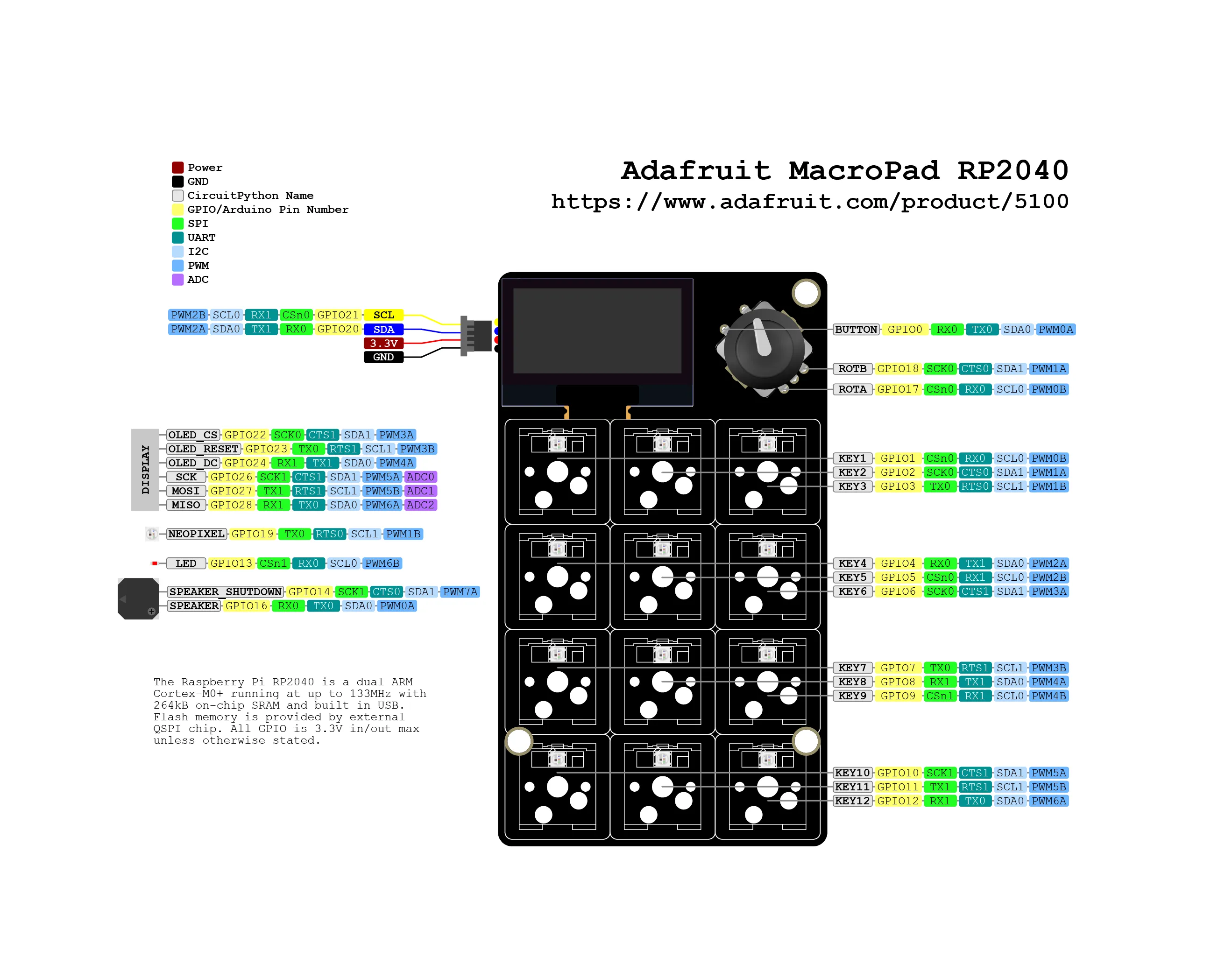
Introduction
Section titled “Introduction”You can buy MacroPad on the official Adafruit store.
This blog post will allow you to handle key press.
Embedded📂 adafruit/macropad-rp2040/keypress
"""Grid layout demo for MacroPad. Displays the key pressed in a grid matching the key layout on thebuilt-in display."""
# adafruit_macropad docs:# https://docs.circuitpython.org/projects/macropad/en/latest/api.html#adafruit-macropad# keyboard docs:# https://docs.circuitpython.org/projects/hid/en/latest/index.html
import displayioimport terminaliofrom adafruit_display_text import bitmap_label as labelfrom adafruit_displayio_layout.layouts.grid_layout import GridLayoutfrom adafruit_macropad import MacroPad
macropad = MacroPad()
main_group = displayio.Group()macropad.display.root_group = main_grouptitle = label.Label(    y=4,    font=terminalio.FONT,    color=0x0,    text="      KEYPRESSES      ",    background_color=0xFFFFFF,)layout = GridLayout(x=0, y=10, width=128, height=54, grid_size=(3, 4), cell_padding=1)labels = []for _ in range(12):    labels.append(label.Label(terminalio.FONT, text=""))for index in range(12):    x = index % 3    y = index // 3    layout.add_content(labels[index], grid_position=(x, y), cell_size=(1, 1))
main_group.append(title)main_group.append(layout)
while True:    key_event = macropad.keys.events.get()    if key_event:        if key_event.pressed:            labels[key_event.key_number].text = f"KEY{key_event.key_number}"        else:            labels[key_event.key_number].text = ""
📂 adafruit/macropad-rp2040/keypress/code.pyView on GitLab ↗
# SPDX-FileCopyrightText: 2021 Kattni Rembor for Adafruit Industries## SPDX-License-Identifier: Unlicense"""MacroPad HID keyboard and mouse demo.
TODO: update all the keys in order to give them fully functionalities.TODO: quick fix for special characters: use US characters that will be mapped into ITA: _ becomes ?
The demo sends "a" when the first key is pressed, a "B" whenthe second key is pressed, "Hello, World!" when the third key is pressed, and decreases the volumewhen the fourth key is pressed. It sends a right mouse click when the rotary encoder switch ispressed. Finally, it moves the mouse left and right when the rotary encoder is rotatedcounterclockwise and clockwise respectively."""
import displayioimport terminaliofrom adafruit_display_text import bitmap_label as labelfrom adafruit_displayio_layout.layouts.grid_layout import GridLayoutfrom adafruit_macropad import MacroPad
macropad = MacroPad()
main_group = displayio.Group()
macropad.display.root_group = main_grouptitle = label.Label(    y=4,    font=terminalio.FONT,    color=0x0,    text="      KEYPRESSES      ",    background_color=0xFFFFFF,)layout = GridLayout(x=0, y=10, width=128, height=54, grid_size=(3, 4), cell_padding=1)labels = []for _ in range(12):    labels.append(label.Label(terminalio.FONT, text=""))for index in range(12):    x = index % 3    y = index // 3    layout.add_content(labels[index], grid_position=(x, y), cell_size=(1, 1))
main_group.append(title)main_group.append(layout)
last_position = 0while True:    key_event = macropad.keys.events.get()
    if key_event:        if key_event.pressed:            if key_event.key_number == 0:                macropad.keyboard.send(macropad.Keycode.A)            if key_event.key_number == 1:                macropad.keyboard.press(macropad.Keycode.SHIFT, macropad.Keycode.B)                macropad.keyboard.release_all()            if key_event.key_number == 2:                macropad.keyboard_layout.write("Hello, World!")            if key_event.key_number == 3:                macropad.consumer_control.send(macropad.ConsumerControlCode.VOLUME_DECREMENT)
            labels[key_event.key_number].text = f"KEY{key_event.key_number}"        else:            labels[key_event.key_number].text = ""
    macropad.encoder_switch_debounced.update()
    if macropad.encoder_switch_debounced.pressed:        macropad.mouse.click(macropad.Mouse.RIGHT_BUTTON)
    current_position = macropad.encoder
    if macropad.encoder > last_position:        macropad.mouse.move(x=+5)        last_position = current_position
    if macropad.encoder < last_position:        macropad.mouse.move(x=-5)        last_position = current_position
📂 adafruit/macropad-rp2040/keypress/keys-with-behaviours/code.pyView on GitLab ↗